FF Nova Mini is a programmable humanoid robot with 17 servo joints. Build programs for it with drag-and-drop blocks in Brain Blocks, right in your web browser, or control it with your voice.
This guide takes you from power-on to running your first program in about 5 minutes — powering on, opening Brain Blocks, connecting over Bluetooth, building and running a program, and powering off.
WARNING: CHOKING HAZARD — SMALL PARTS. NOT FOR CHILDREN UNDER 3 YEARS. BATTERIES ARE TO BE CHARGED ONLY UNDER ADULT SUPERVISION. DO NOT TOUCH THE ROBOT WHILE IT IS MOVING.
Before You Start
Before Your First Session.
The packing list has been verified — robot, user manual, power adapter, and data cable.
Nova Mini is fully charged. The power adapter light turns from red to green when charging is complete.
Nova Mini is placed on a smooth, flat surface on the floor — not on a desk, shelf, or other raised surface.
No people, pets, or obstacles are within 1 m (3 ft) of the robot.
You have a computer with Bluetooth turned on and a browser that supports Web Bluetooth, such as Chrome or Edge.
The Nova Mini phone app is closed — only one device can connect to the robot at a time.
Step 1
Power On.
Step 1 · Power on
Take Nova Mini out of the box and stand it on a flat surface.
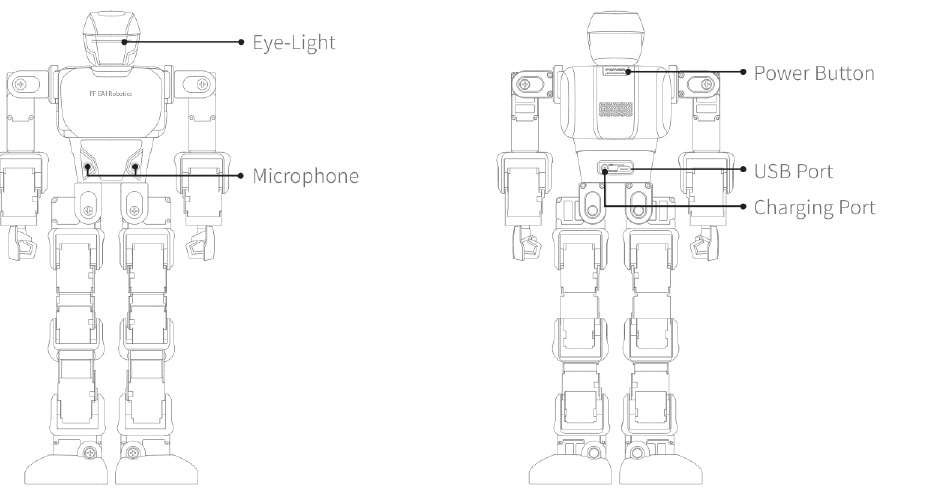
Press and hold the power button for 5 seconds. The power button is on the robot's back, at the top of the torso.
Release the button when Nova Mini says "Hello Humanity." The robot is now ready to connect.
Choose Nova Mini. The Brain Blocks Nova Mini Edition editor opens.
Step 3
Connect Nova Mini.
Step 3 · Bluetooth pairing
Click Connect at the top left of Brain Blocks. Your browser's Bluetooth list opens.
Select your Nova Mini — its name starts with K1- (for example, K1-00297) — then click Pair.
When pairing succeeds, the status indicator turns from orange to green and shows "Nova mini connected."
Connection Status
Indicator
Meaning
Orange
Nova mini not connected — click Connect and pick the robot
Green
Nova mini connected — ready to run programs
Group Control
To control several robots at once, click Group control, then select each Nova Mini in the Bluetooth list and click Pair. Repeat until every robot is paired.
Stay within 1–2 m (3–6 ft) of the robot while connecting. If Nova Mini does not appear in the list, confirm it is powered on and not connected to the phone app.
Step 4
Build and Run a Program.
Step 4 · Drag, drop, and run
Choose a category from the block bar on the left — Events, Motion, Actions, Joints, AI Settings, Status, Control, Operators, or Variables.
Drag blocks into the middle workspace and snap them together in the order you want them to run.
When your program is ready, click Run to send it to Nova Mini.
To test movement without writing a program, use the Drive buttons at the top of the page — Forward, Back, Left, Right, Turn L, and Turn R.
Step 5
Power Off.
Click Disconnect in Brain Blocks.
Press and hold the power button until Nova Mini says "See you next time humanity."
If connected through the phone app: tap the Connection icon at the top right of the Main page, then tap Shutdown.
Charging
Charging the Battery.
Plug the power adapter into the DC charging port on the robot's back.
Plug the other end of the adapter into a wall outlet. The adapter light is red while charging.
Charging is complete when the adapter light turns green.
Let the robot cool to room temperature before charging. Charge only between 0–35°C (32–95°F), away from flammable surfaces, and never leave the robot unattended while charging.
Voice Control
Talk to Nova Mini.
Nova Mini listens through the microphone on the front of its torso. Voice control works only when the robot is not connected over Bluetooth.
Power on Nova Mini and disconnect it from Brain Blocks and the phone app.
Say "Hey, Nova Mini." The robot answers "I'm here."
Say a preset voice command, such as "move forward" or "come back."
See the Voice Command Card for the full list of preset commands. You can also find it in the phone app under Settings > Voice Command Card.
Voice Programming
Program with Your Voice.
Say several commands in a row, and Nova Mini performs them in order.
Say "Hey, Nova Mini" and wait for "I'm here."
Within 10 seconds, say "programming." The robot answers "Programming Mode has been started."
Say one command, then wait for the success sound before saying the next. A command without the sound was not recorded.
When you have said all your commands, say "executing." Nova Mini performs them in sequence.
Voice Commands
Say
Result
"Hey, Nova Mini"
Wakes the robot — it answers "I'm here."
"programming"
Starts Voice Programming Mode
"executing"
Runs the recorded commands in order
"cancel"
Exits Voice Programming Mode
Voice Programming Mode exits automatically if no command is heard for 30 seconds.
Features
What Nova Mini Can Do.
Standing Up Automatically
Sensors and a built-in gyroscope detect when Nova Mini tips over and bring it back upright. Turn this on or off at the top right of the Bluetooth Control page.
Action Stunts
Combine joints, moves, and timing to create thousands of different actions.
Troubleshooting
Common Issues.
Charge the robot fully — wait until the adapter light turns green.
Press and hold the power button until the robot says "Hello Humanity."
If it still does not power on, contact support.
Confirm the robot is powered on.
Close the phone app — only one device can connect at a time.
Move your computer within 1–2 m (3–6 ft) of the robot.
Confirm Bluetooth is on and you are using Chrome or Edge.
Click Connect again, or restart the robot and try again.
Disconnect from Brain Blocks and the phone app — voice control does not work while Bluetooth is connected.
Use the preset voice commands, starting with "Hey, Nova Mini."
Move to a quiet place with minimal background noise.
Place the robot on a smooth, flat surface. It cannot balance on uneven or bumpy surfaces.
Check that the battery is sufficiently charged.
Check that both ends of the charging cable are plugged in firmly.
Confirm the wall outlet works, then charge again.
Turn the robot off, then power it on again.
Make sure the robot is sufficiently charged.
Check the video tutorials at www.ff.com.
If the issue persists, contact support.
Overview
Getting to Know Nova Mini.
The eye light and microphone are on the front. The power button, USB Type-C port, and DC charging port are on the back.
Specifications
Technical Specs.
Dimensions
7.0 × 4.0 × 14.0 in
Weight
2.1 lb
Material
Aluminum alloy frame, ABS + PC shell
Servo motors
17 (chest 1 / arms 3 × 2 / legs 5 × 2)
Wireless connection
Bluetooth 4.2 BLE
BLE frequency band
2400–2483.5 MHz
BLE max. RF power
20 dBm
Control methods
Web-based Brain Blocks, voice control
External ports
DC charging port, USB Type-C port
Battery
2000 mAh lithium battery pack
Adapter
Input 100–240 V ~ 50/60 Hz 0.6 A; output DC 8.4 V 2 A
Read all safety and operating instructions before you or your child use Nova Mini, and keep them for future reference.
Watch Your Fingers
Do not touch the robot while it is moving.
Do not forcibly remove or lift the robot's head, or force its joints into position.
Keep at least 1 m (3 ft) between the robot and people, animals, and property.
Operating Environment
Use only on smooth, flat surfaces — never on shelves, desks, or other raised surfaces it could fall from.
Do not use in hazardous or restricted areas, such as near high-voltage lines, in train stations, airports, or on public transport.
Keep the robot in sight at all times while it operates.
Do not exceed one hour of continuous use.
Operate and store between 0–35°C (32–95°F). Do not leave the robot in a parked car.
Do not throw, drop, kick, step on, or puncture the robot. Check it regularly for cracked or broken parts, and stop using it if you find damage.
Battery & Charging
Use only the supplied adapter and cable, and do not use them to charge other devices.
Batteries are to be charged only under adult supervision. The adapter is not a toy.
Do not charge on or near flammable surfaces such as carpet or wood, and do not cover the robot or adapter while charging.
Never charge a damaged or leaking battery. If liquid touches skin, wash with soap and plenty of water; if it touches eyes, flush with cold water and seek medical attention.
If you notice unusual smells, sounds, or smoke, unplug the charger immediately.
Do not open, crush, pierce, or heat the battery above 35°C. Never incinerate it or put it in a microwave.
Photosensitive Seizures
A small percentage of people may experience seizures or blackouts when exposed to flashing lights. If you or a family member has a history of seizures, consult a doctor before use. Stop using the robot and consult a doctor if you experience headaches, blackouts, twitching, or disorientation.
Disposal
Do not dispose of the robot or its battery in household waste. Take them to an electronics or battery recycling point in accordance with local regulations, or ask your retailer about recycling programs.
Do not attempt to open, repair, or disassemble the robot. Damage caused by disassembly voids the warranty.
Warranty
Limited Warranty.
FF Nova Mini is warranted by FF EAI Robotics Inc. against manufacturing defects in materials and workmanship for 1 year, for the original purchaser of a new product in its original carton. FF EAI Robotics will repair or replace a defective product, at its option, at no charge.
Register your product at ff.com.
If a defect arises, email support@ff.com to request a Return Material Authorization (RMA) number.
Include the RMA number with your package. Returns without an RMA number are not accepted. The purchaser is responsible for shipping costs.
Not Covered Under Warranty
Consumable parts such as batteries, unless failure is caused by a defect in materials or workmanship
Damage caused by accidents, misuse, abuse, fire, water, lightning, or electrical surges
Damage caused by use with non-original products, or outside the intended uses described by FF EAI Robotics
Product alteration, modification, or unauthorized repair or disassembly
Cosmetic damage and normal wear and tear
The limited warranty is nontransferable and governed by the laws of the State of California, with disputes resolved through binding non-appearance-based arbitration. Use of the robot is subject to the Software License Agreement. See the printed user manual or www.ff.com for the complete terms.
Compliance
Regulatory & Compliance.
Any changes or modifications not expressly approved by the party responsible for compliance could void the user's authority to operate this equipment.
Hiermit erklärt FF EAI ROBOTICS, dass der Funkanlagentyp [Nova Mini] der Richtlinie 2014/53/EU entspricht. Der vollständige Text der EU-Konformitätserklärung ist unter der folgenden Internetadresse verfügbar: https://www.ff.com
Due to ongoing product updates, some functions, controls, or displays may differ from this guide. For anything unclear, contact official customer support.